What worries you most about managing your diet?
18 patients; multiple answers allowed.
55.6%
10 people Getting too much of a nutrient
50.0%
9 people Not knowing which foods are safe or how much to eat
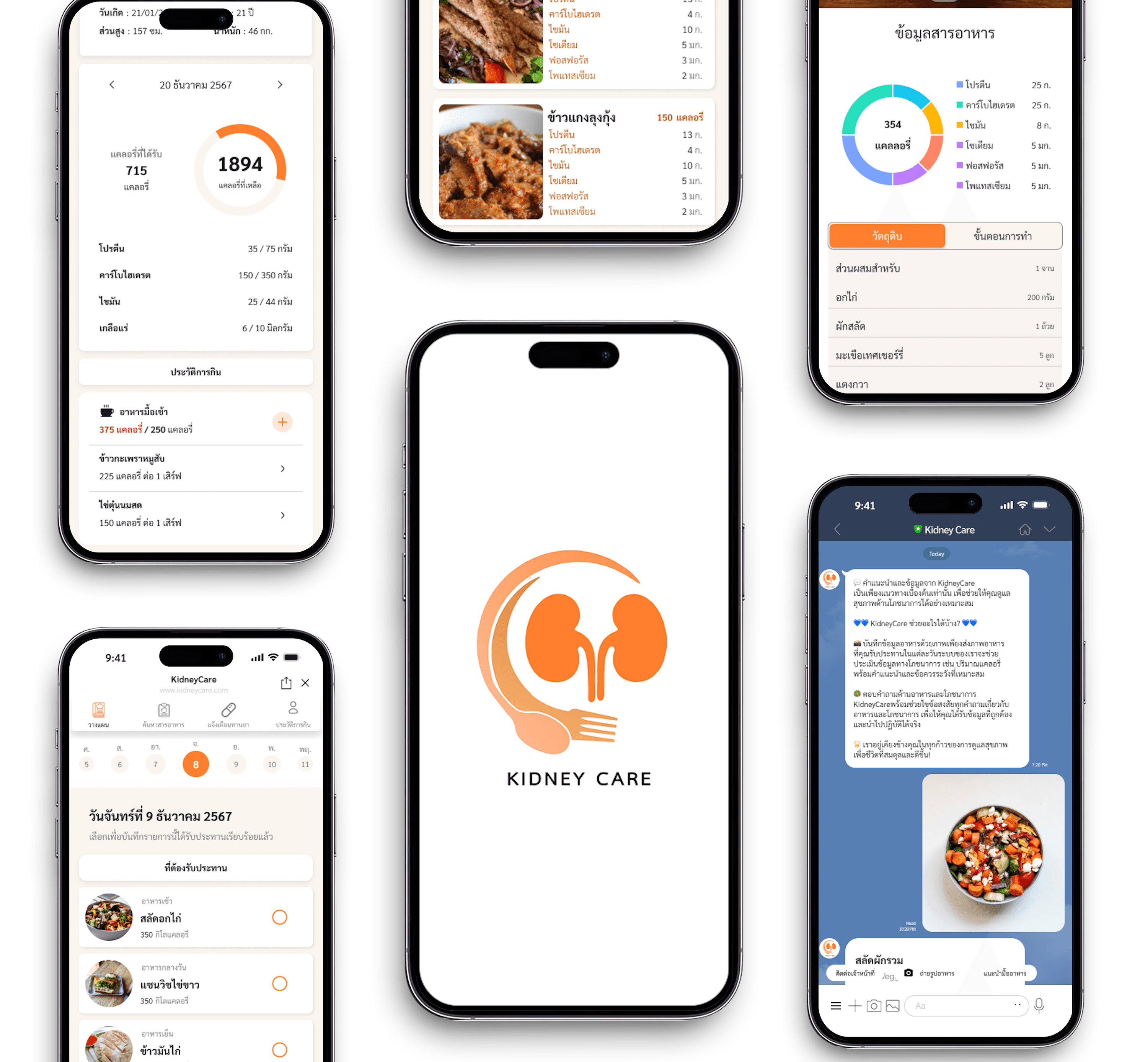
Software Engineering Project
An application developed to serve as a convenient tool for chronic kidney disease patients and their caregivers, focusing on personalized nutrition planning with a faster and more convenient approach to promote better health and quality of life.
What I designed and built in this project
Designed the end-to-end user experience, wireframes, and high-fidelity prototypes in Figma. Conducted user interviews and synthesized research findings into design decisions.
Developed the medication reminder (Pill) interface and integrated LINE notifications system using TypeScript and Tailwind CSS.
Developed and integrated AI features including meal plan generation and food analysis using Object Detection to identify ingredients or dishes for nutritional database comparison.
AI meal planning, food analysis, and medication support through LINE
KidneyCare is a LINE OA-based application built to address the complex nutritional challenges faced by chronic kidney disease (CKD) patients. The app integrates AI-powered meal planning, real-time food analysis, and medication reminders into a single platform that both patients and caregivers can access through LINE — a familiar, low-barrier channel.
The problem this project addresses and the outcome it aims to achieve
Kidney disease patients often face difficulty calculating and planning meals, as well as managing daily medication schedules. This increases the risk of complications when nutrition is not managed correctly.
Build a platform that helps calculate nutrition and create personalized meal plans, with medication reminders to improve quality of life for kidney disease patients.
Survey of 29 participants — 18 CKD patients and 11 caregivers
18 patients; multiple answers allowed.
10 people Getting too much of a nutrient
9 people Not knowing which foods are safe or how much to eat
Follow-up to the 9 of 18 patients who answered yes; multiple answers allowed.
6 people Repetitive meals or boring menus
4 people Cannot think of a menu
4 people Unsure whether a chosen food is safe
11 caregivers; multiple answers allowed.
8 people Calculating the patient's nutrient intake
7 people Lacking knowledge of different minerals
9 caregivers answered this set of questions; multiple answers allowed.
7 people Look for more information online
7 people Question the reliability of what they find
Five core pain points discovered from user research
Many patients worry about consuming too much of a nutrient and are unsure which foods suit their condition or how much to eat. When several dietary restrictions must be considered together, patients and caregivers need to check more information before choosing ingredients for each meal.
Patients who struggle to choose or prepare food may run out of ideas and repeat the same meals, making long-term dietary management difficult and monotonous.
Caregivers must consider several nutrients, along with food portions and ingredients. Calculating and planning each meal takes considerable time and knowledge.
Caregivers may search online for more information, but conflicting sources can leave them unsure whether the advice is accurate and suitable for the patient.
Patients taking several medicines or doses at different times may get confused or miss a dose without a clear reminder or schedule.
Two representative profiles from the project’s design materials
CKD Patient
“I don’t want things to get any harder, so I need to manage my diet carefully.”
Somchai is living with stage 5 chronic kidney disease and other health conditions, including high blood pressure and gout. He wants to improve his quality of life by taking care with the food he eats.
Caregiver
“I don’t know how to plan meals for my mother, who has kidney disease.”
Rachata works at a company and helps care for his mother, who has kidney disease. He buys ingredients, prepares meals, and balances these tasks with work, so planning meals can be difficult.
A caregiver’s path from uncertainty about food choices to planning daily meals.
Scenario: Rachata is planning meals for his mother, who has kidney disease.
Realizes his mother needs meals suited to her condition.
Searches for a way to plan suitable meals.
Enters dietary information to create a meal plan.
Reviews the suggested meals and follows the plan.
Unsure which foods are safe.
Struggles to choose a reliable tool.
There is a lot of information to enter.
Needs confidence in each meal choice.
Scroll horizontally to view every stage.
Five core capabilities designed around real patient needs
Use AI to generate personalized meal plans for each day or week, tailored to individual dietary needs.
Consult about food, health, and nutrition with an AI Chatbot available around the clock.
Snap a photo of your meal and AI instantly breaks down the nutrition — calories, protein, carbohydrates, and fat.
Search nutritional data for any dish to help choose the healthiest menu options.
Set daily medication alerts so you never miss a dose and stay on top of your health routine.
Comparing KidneyCare against existing kidney health apps
| Feature | KidneyCare | KidneyDiet | CKD Rak Tai | Hello Kidney |
|---|---|---|---|---|
| Meal Planning System | ||||
| Nutritional Info per Menu | ||||
| AI Chatbot | ||||
| Medication Reminder |
Two primary user journeys designed for patients and caregivers
The user selects their CKD stage and dietary preferences, then the AI generates a weekly meal plan. Each meal can be swapped or adjusted, and the plan is saved to the daily schedule.
Loading flowchart…
The user searches for a specific dish by name or photo. The system returns a full nutritional breakdown and flags any minerals that exceed the recommended daily limit for CKD patients.
Loading flowchart…
Add Medicine Flow
The original flow split the add-medicine process across three separate screens — medicine info, scheduled times, and duration.
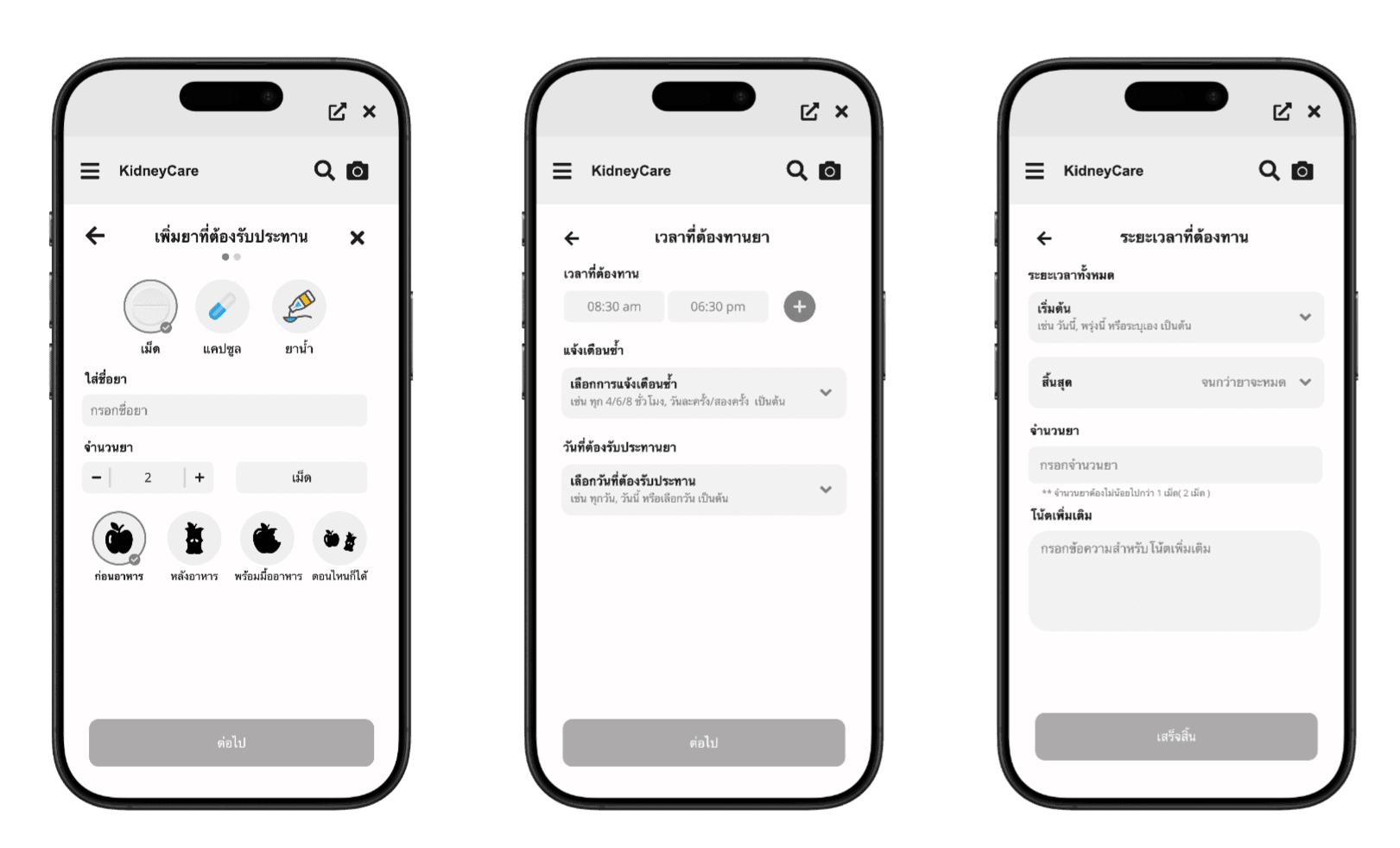
After an internal team discussion, we consolidated everything into a single screen.
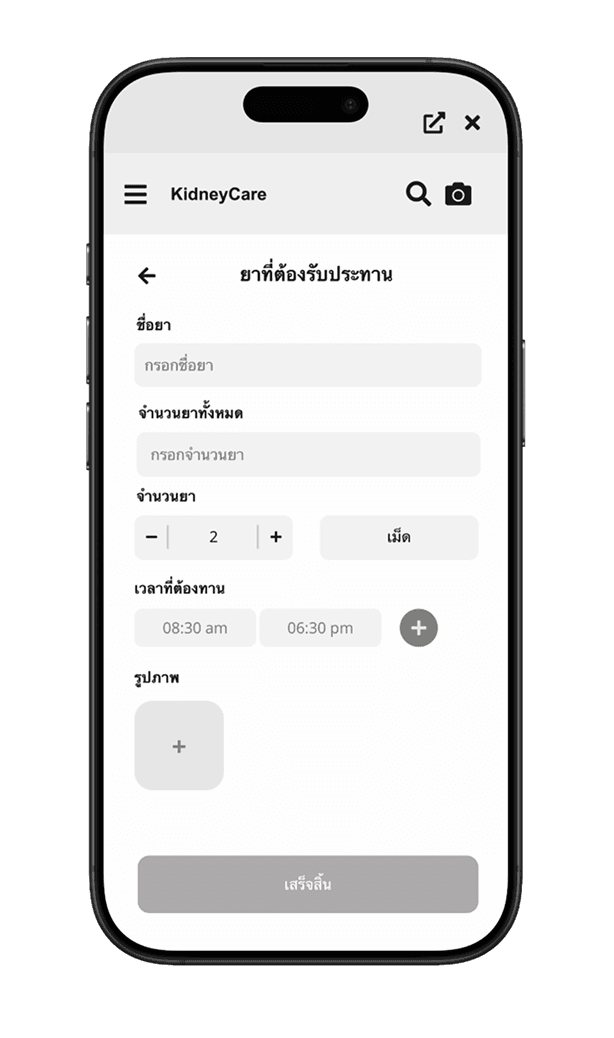
Medication reminders are a secondary feature. The multi-step structure placed too much effort on a non-core task, pulling focus away from the app's primary functions.
Fewer screens reduce cognitive load for older users and lower the risk of dropping off before the setup is fully saved.
Results from real users — scored 1–10 per task (9 users)
| Testing Tasks | Mean Score |
|---|---|
Register Register and complete personal health profile | 8.6 |
Meal Planning Generate and adjust weekly meal plans | 6.8 |
Nutrition Search Search for nutritional info via text or photo | 8.4 |
Medication Reminder Set up medication schedules and alerts | 3.4 |
Eating History Review past nutritional intake and trends | 8.6 |
| Overall Average | 7.16 |
UI improvements applied after usability testing feedback
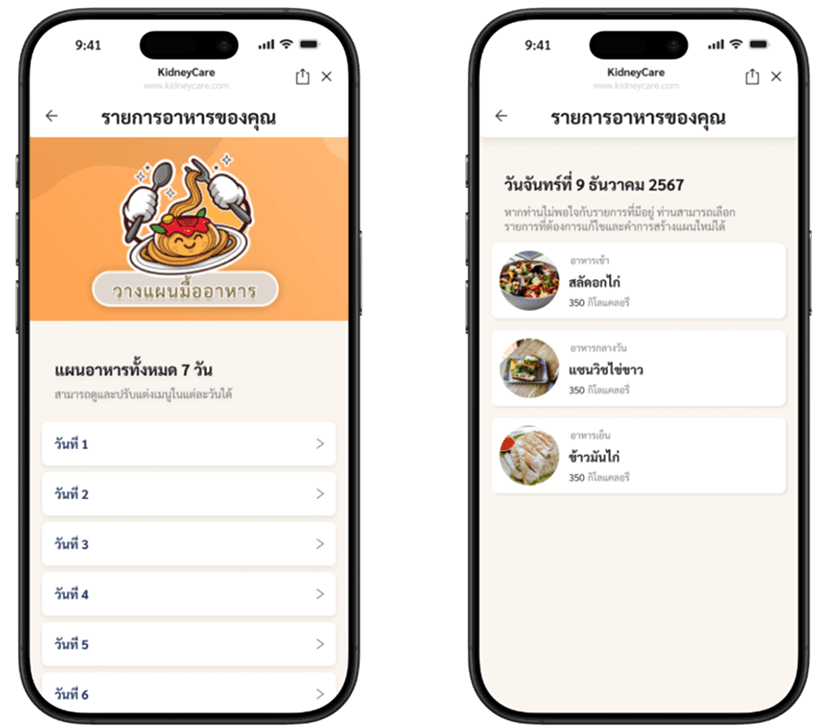
After the AI generated a meal plan, the original UI displayed every meal for every day all at once. With a 30-day plan this became an extremely long list that was hard to navigate and edit. We restructured it to show a collapsed day-by-day view first — users tap into a specific day to view or adjust meals.
Before
Organizing daily meal lists felt cluttered and overwhelming — it was hard to know where to look.
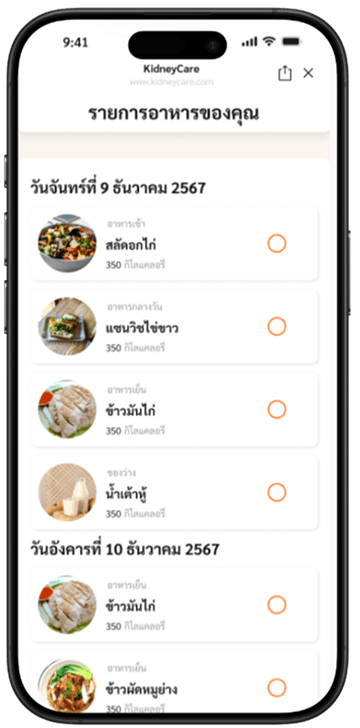
After
Daily meal lists are now easy to read and manage at a glance.
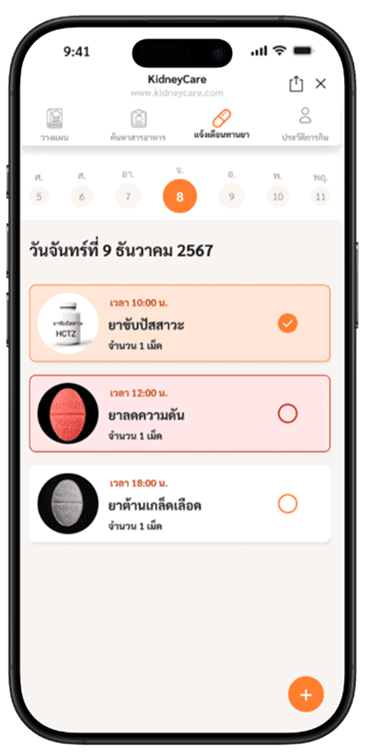
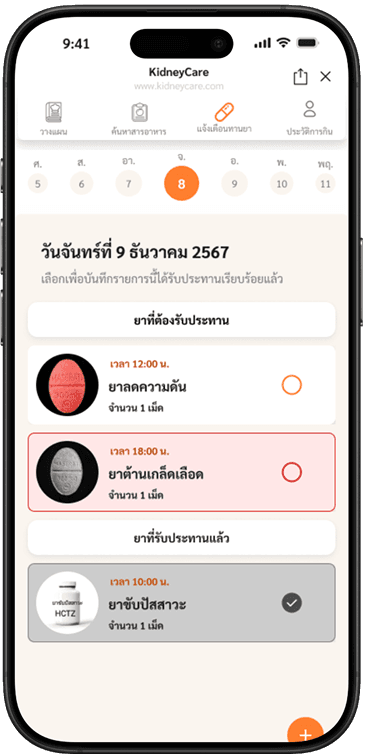
The original view showed all medicines in a single flat list, making it difficult for users to tell at a glance which medicines still needed to be taken and which had already been completed. We split the list into two clear sections — medicines to take and medicines already taken — so users can see their status immediately.
Before
Tapping each medicine felt more like editing than actually logging that I had taken it.
After
It's now clearly visible which medicines have been taken and which still need to be taken.
Explore the interactive Figma design board below.
You can pan, zoom, and interact with the live design board below.